Designing Menus with Encore DVD

Learn to create great looking, functional menus using Encore DVD 1.5 with this insider's guide. To help you design better menus, this book explains all the facets of DVD menu design.
 TABLE OF CONTENTS
 Use the Character palette to set text properties. Select a range of text, or an entire text block, and choose from the options in the palette. Although the options are not as extensive as the option in Photoshop, Encore DVD's text options will suffice for the majority of most text formatting needs (Figure 4-9).
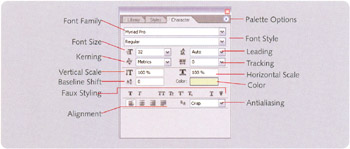
Font Family: All the currently installed fonts.
Font Style: All available styles for a font family.
Font Size: The size of the text.
Leading: The vertical space between baselines of text.
Kerning: The space between two characters.
Tracking: The spacing between all characters in a word or a block of type
Vertical Scale: The vertical scale of the text.
Horizontal Scale: The horizontal scale of the text.
Baseline Shift: Offset of the text from the baseline.
Color: Color for the selected text.
Faux Styling: Bold, italic, all caps, small caps, superscript, subscript, underline, and strike through styles, respectively, are set here.
Alignment: Controls how lines of text are arranged in paragraphs.
Antialiasing: Sets the smoothness for the text.








