Designing Menus with Encore DVD

Learn to create great looking, functional menus using Encore DVD 1.5 with this insider's guide. To help you design better menus, this book explains all the facets of DVD menu design.
 TABLE OF CONTENTS
 The three disciplines listed in the title of this chapter help you craft the viewer's experience when watching and interacting with a DVD. This chapter is a primer on how to plan the interface and apply good interface design principles.
This chapter presents the following topics.
Conducting research
Designing interaction and navigation
Prototyping
Usability testing
When someone mentions process, others tend to yawn, myself included. Joking aside, a well-defined process shortens development and improves the quality of the overall project. Although the DVD production process covers many steps between inception and the shiny disc, I'm going to cover only the interface and visual design stages required for designing menus. This chapter covers interaction design, but Figure 3-1 on page 36 also shows the DVD authoring process.
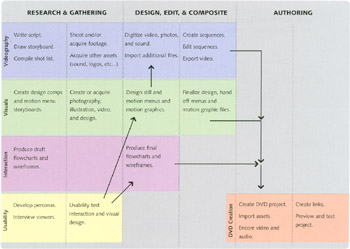
You might wonder why I am covering user research and interaction design since most DVDs are fairly simple one to two menus and perhaps one video. That may be true of some menus, but the vast majority of A-title Hollywood DVDs have a dozen or more menus and as many video segments. Training, sales, and education DVDs can be even more complex. The question to ask yourself is how complicated is the project going to be and what really needs to be done to make sure the disc is easy to use. If you are putting a lot of menus on timelines on the DVD, you will...