Designing Menus with Encore DVD

Learn to create great looking, functional menus using Encore DVD 1.5 with this insider's guide. To help you design better menus, this book explains all the facets of DVD menu design.
 TABLE OF CONTENTS
 This chapter covers the creation of still menus in Photoshop and Encore DVD, the integration between the two applications, and how to set links in Encore DVD.
For more information on the characteristics of a still menu, see "Still Menu" on page 33.
Encore DVD has two workflows for creating still menus: working exclusively in Encore DVD or designing menus in Photoshop before importing them to Encore DVD. Figure 7-1 shows the workflow for creating menus in either application. Table 7-3 lists Encore DVD's Photoshop support.
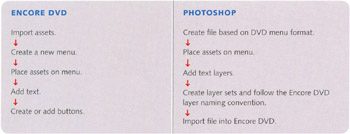
Encore DVD uses the Photoshop file format (.PSD) for menus. For this reason, use Encore to create menus because it correctly renders Photoshop layers, layer sets, and layer effects. Text editing, moving, and scaling are also supported in Encore DVD. Moving back and forth between the two applications is easy and changes made in one appear immediately in the other.
Before importing a layered Photoshop file into Encore DVD, do the following.
Size the document according to both the project's TV standard and the desired aspect ratio.
Create the design and organize the layers according to the Encore DVD layer set naming convention. Place layers associated with one button into a single layer set with a unique name. Duplicate names could confuse you when creating links.
Save the file as a Photoshop file (.PSD). Select File > Save or press Ctrl+S.
In Encore DVD, use File > Import...