Designing Menus with Encore DVD

Learn to create great looking, functional menus using Encore DVD 1.5 with this insider's guide. To help you design better menus, this book explains all the facets of DVD menu design.
 TABLE OF CONTENTS
 Although Encore DVD's Tool palette has fewer tools than Photoshop's, it has the tools used for viewing, selecting, and editing objects in the Menu Editor's workspace. Figure 6-22 shows the Tool palette and lists accelerator keys for selecting tools.
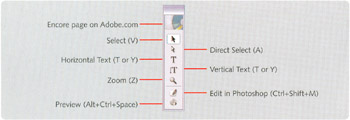
To hide or show the Tool palette, choose Window > Tools or press the Tab key. Pressing Shift and Tab keys will hide all palettes but keep the Tool palette onscreen.
How to use the tools.
Use the Select tool,  , to move or scale buttons and layer sets.
Use the Direct Select tool,  , to move or scale a layer within a button or layer set.
Use the text tools,  and
and  , to create horizontal and vertical text.
Use the Zoom tool,  , to adjust the magnification level.
| Production Tip | A single tap of the shortcut key switches to the tool, but pressing and holding a key enables the tool temporarily. |
The Edit in Photoshop and Preview buttons are not tools; they are commands. Edit in Photoshop will transfer the current menu to Photoshop for editing. Preview launches the Project Preview window.
When you select a layer set in Encore DVD, a blue border is drawn around it. On each of the corners and midpoints of this border are handles for resizing the layer set. Click-dragging a layer set from within the border will move the layer set to a new position.
When...