Designing Menus with Encore DVD

Learn to create great looking, functional menus using Encore DVD 1.5 with this insider's guide. To help you design better menus, this book explains all the facets of DVD menu design.
 TABLE OF CONTENTS
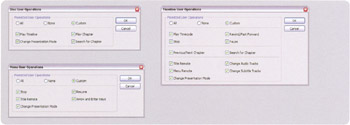
 User Operations (UOPs) are the interactions a viewer has with the DVD. These operations are accessed with a DVD remote control with a settop box, or with the mouse pointer in a software based DVD player. A user operation can represent a single operation or a collection of similar operations. A common example is disabling all user operations to prevent fast forwarding through the FBI warning video. Encore DVD has three User Operations dialogs, one for a menu, a timeline, or the disc.
| Production Tip | To see a explanation for a user operation, mouse over the text and a tool tip will appear. |
To set user operations for a menu, click Set in the menu's Properties palette or choose Menu > Set Menu User Operations.
To set user operations for a timeline, click Set in the timeline's Properties palette or choose Timeline > Set Timeline User Operations.
To set user operations for the disc, click Set in the Disc's Properties palette or choose File > Set Disc User Operations.