Designing Menus with Encore DVD

Learn to create great looking, functional menus using Encore DVD 1.5 with this insider's guide. To help you design better menus, this book explains all the facets of DVD menu design.
 TABLE OF CONTENTS
 All style files are a Photoshop file with a single layer containing one or more layer effects.
The Styles palette contains graphic effects for embellishing menus. There are three categories of Styles: text, shape, and image.
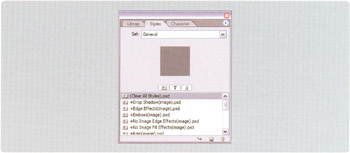
A text, shape, or image style can be applied to any single layer, regardless of layer type. When a style is applied to a layer set, however, only certain layers within the layer set will be affected by the style.
When applied to a layer set, a text style is applied to the first text layer in the layer set that is not a highlight layer.
When applied to a layer set, a shape style is applied to the first shape layer in the layer set that is not a highlight layer.
When applied to a layer set, an image style is applied to all layers in the layer set, except highlight layers.
To apply a style do one of the following.
Drag a style from the Styles palette onto an item in the Menu Editor window.
Select an item in the Menu Editor or Layers palette, and double-click a style in the Styles palette.
To remove a style apply the style named "Clear All Styles.psd."
When you apply a text or shape style on an item with existing styles, the old style is removed and the new style is applied. Image styles, however, are additive. If you apply an image style to a layer that already has...