The Focal Easy Guide to Adobe Audition 2.0

Snapping

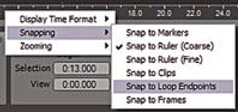
Snapping settings

Snapping assists in aligning your audio clips along the timeline. When moving audio clips along the vertical timeline with snapping turned on clips will snap (line up) to markers, clips, loop endpoints, frames and multiple snap points can be selected. To set snapping right click on the horizontal ruler and select Snapping options.

UNLIMITED FREE
ACCESS
TO THE WORLD'S BEST IDEAS

SUBMIT
Already a GlobalSpec user? Log in.

This is embarrasing...

An error occurred while processing the form. Please try again in a few minutes.

Customize Your GlobalSpec Experience

Category: Industrial Pins
Finish!
Privacy Policy

This is embarrasing...

An error occurred while processing the form. Please try again in a few minutes.