The Focal Easy Guide to Adobe Audition 2.0

Editing Procedures Overview

Listed below are a number of everyday editing procedures for Audition 2.0 including:

  • Arranging and Moving Clips

  • Copy and Paste

  • Trimming

  • Slipping

  • Splitting

  • Deleting

To move an audio clip:

  1. With the Move Tool select the audio clip with a left click and move to new location

  2. With the Hybrid Tool right click the audio clip and move.

To make a copy of an audio clip:

To copy a clip up/down the timeline

  1. With the Move Tool selected, right click and move the clip to new location

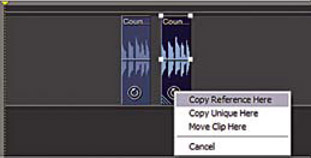
  2. As you let go of the mouse a drop down menu appears

  3. Select one of the following:

    • Copy Reference Here: copies the original file; any processing done will affect the first clip as well as the copied audio clip

    • Copy Unique Here: makes a new clip which can be altered and processed without affecting the original audio

      Copy options

    • Move Clip Here: simply moves the audio clip to the new location without making a copy

To copy and paste an audio clip:

  1. Select the clips you want to copy/paste (Hold down CTRL to add more clips)

  2. Choose Edit>Copy (CTRL+C)

  3. Move to new timeline point>edit>paste (CTRL+V)

UNLIMITED FREE
ACCESS
TO THE WORLD'S BEST IDEAS

SUBMIT
Already a GlobalSpec user? Log in.

This is embarrasing...

An error occurred while processing the form. Please try again in a few minutes.

Customize Your GlobalSpec Experience

Category: Video and Audio Software
Finish!
Privacy Policy

This is embarrasing...

An error occurred while processing the form. Please try again in a few minutes.