The Focal Easy Guide to Adobe Audition 2.0

Adding Real-time FX from Multitrack View

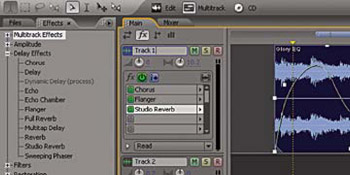
Highlight the Effects tab to display the FX view. Below the Volume and Pan knobs you have the FX insert boxes which allow you to insert up to 16 effects per track.

There is an Effects Power Button to turn on/off the whole FX list and a Pre/post Fader Button that is used to insert FX before Sends and EQ (pre fader), or after Sends and EQ (post fader). Also, you can turn off individual effects by clicking on the Power button beside them. The Freeze button allows you to freeze or process the whole track with the effects you have inserted. This will help to free up your computers processing power for other tasks. If you need to make an adjustment, simply unfreeze the track, make adjustments and freeze again.

To add real-time effects:

  1. Click on the located on the right-hand side of the FX insert window to show all FX list

  2. Insert an effect

  3. Or drag and drop an Effect from the main Effects Panel onto the track itself in Main View

Note

Effects can be changed in real-time as your session is playing

UNLIMITED FREE
ACCESS
TO THE WORLD'S BEST IDEAS

SUBMIT
Already a GlobalSpec user? Log in.

This is embarrasing...

An error occurred while processing the form. Please try again in a few minutes.

Customize Your GlobalSpec Experience

Category: Audio Mixers and Consoles
Finish!
Privacy Policy

This is embarrasing...

An error occurred while processing the form. Please try again in a few minutes.