AutoCAD Pocket Reference, 4th Edition

The ARRAY command allows you to make multiple copies in a RECTANGULAR or Circular (POLAR) pattern. The maximum limit of copies per array is 100,000. This limit can be changed but should accommodate most users. (Refer to Help menu)
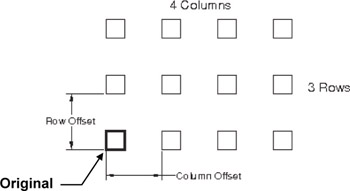
This method allows you to make multiple copies of object(s) in a rectangular pattern. You specify the number of rows (horizontal), columns (vertical) and the offset distance between the rows and columns. The offset distances will be equally spaced.
Offset Distance is sometimes tricky to understand. Read this carefully. The offset distance is the distance from a specific location on the original to that same location on the future copy. It is not just the space in between the two. Refer to the example below.
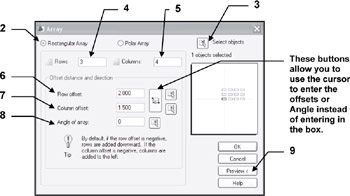
To use the rectangular array command you will select the object(s), specify how many rows and columns desired and the offset distance for the rows and the columns.
Refer to step by step instructions on page 1-3.
Example of Rectangular Array:

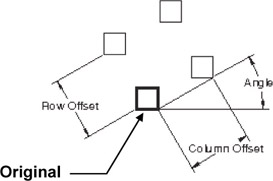
Example of Rectangular Array on an angle:
Notice the copies do not rotate. The Angle is only used to establish the placement.

Select the ARRAY command using one of the following:
<b class="bold">Ribbon = Home tab / Modify panel /<span class="inlinemediaobject"><img alt="Image from book"> border="0"> height="26"> id="IMG_3"> src="https://images.books24x7.com/bookimages/id_30311/figu1-3_1.jpg"> title=""> width="26"></span>Keyboard = Array</b>

Select " Rectangular Array".
Select the " Select Objects" button.
This will take you back...