AutoCAD Pocket Reference, 4th Edition

DONUT

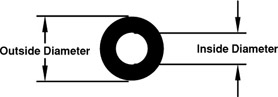
A Donut is a circle with width. You will define the Inside and Outside diameters.

  1. Select the DONUT command using one of the following:

    <b class="bold">Ribbon = Home tab / Draw panel / <span class="inlinemediaobject"><img alt="Image from book"> border="0"> height="19"> id="IMG_221"> src="https://images.books24x7.com/bookimages/id_30311/figu4-22_2.jpg"> title=""> width="22"></span>Keyboard = DO </b>
  2. The following prompts will appear on the command line:

    Command: _donutSpecify inside diameter of donut: <b class="bold"><i class="emphasis">type the inside diameter </i></b>Specify outside diameter of donut: <b class="bold"><i class="emphasis">type the outside diameter </i></b>Specify center of donut or : <b class="bold"><i class="emphasis">place the center of the first donut</i></b>Specify center of donut or : <b class="bold"><i class="emphasis">place the center of the second donut or</i></b>                                    <b class="bold"><i class="emphasis"> to stop</i></b>

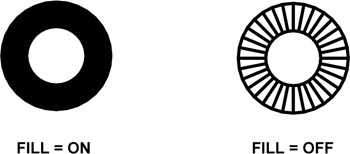
Controlling the "FILL MODE"

  1. Command: type FILL

  2. Enter mode [ON / OFF] : type ON or OFF

  3. Select type REGEN to regenerate the drawing to show the latest setting of the FILL mode.

UNLIMITED FREE
ACCESS
TO THE WORLD'S BEST IDEAS

SUBMIT
Already a GlobalSpec user? Log in.

This is embarrasing...

An error occurred while processing the form. Please try again in a few minutes.

Customize Your GlobalSpec Experience

Category: Vacuum Furnaces
Finish!
Privacy Policy

This is embarrasing...

An error occurred while processing the form. Please try again in a few minutes.