AutoCAD Pocket Reference, 4th Edition

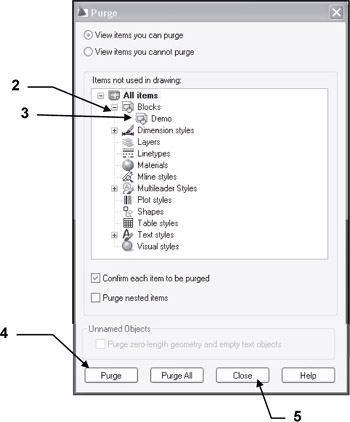
You can remove a block reference from your drawing by erasing it; however, the block definition remains in the drawing's block definition table. To remove any unused blocks, dimension styles, text styles, layers and linetypes you may use the Purge command.
How to delete unwanted and unused blocks from the current drawing.
Select the Purge command using one of the following:
<b class="bold">Ribbon = None</b><b class="bold">Application Menu = Drawing Utilities / Purge</b><b class="bold">Keyboard = Purge</b>
Select the + sign beside Blocks.
Select the block that you wish to purge.
Select the Purge button.
Select the Close button.

When you create a Block it is saved within the drawing you created it in.
(If you open another drawing you will not find that block.)