AutoCAD Pocket Reference, 4th Edition

AutoCAD provides you with two preset Text Styles named "Standard" and "Annotative". You may want to create a new text style with a different font and effects. The following illustrates how to create a new text style.
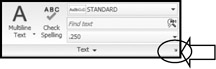
Select the TEXT STYLE command using one of the following:

Select the NEW button.

Type the new style name in STYLE NAME box.
Styles names can have a maximum of 31 characters, including letters, numbers, dashes, underlines and dollar signs. You can use Upper or Lower case.
Select the OK button.
Select the FONT.
Enter the value of the Height.
| Note | If the value is 0, AutoCAD will always prompt you for a height. If you enter a number the new text style will have a fixed height and AutoCAD will not prompt you for the height. |
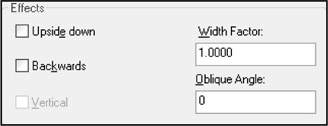
Assign EFFECTS.

UPSIDE-DOWN
Each letter will be created upside-down in the order in which it was typed.
(Note: this is different from rotating text 180 degrees.)
BACKWARDS
The letters will be created backwards as typed.
VERTICAL
Each letter will be inserted directly under the other. Only .shx fonts can be used.
VERTICAL text will not display in the PREVIEW box.
OBLIQUE ANGLE
Creates letter with a slant, like italic. An angle of 0 creates a vertical letter. A positive angle will slant the letter forward. A negative angle will slant the letter backward.
WIDTH FACTOR
This effect compresses or extends the width of each character.
A...