COORDINATE INPUT
In this Section you will learn how to place objects in specific locations by entering coordinates. This process is called Coordinate Input.
Autocad uses the Cartesian Coordinate System.
The Cartesian Coordinate System has 3 axes, X, Y and Z.
The X is the Horizontal axis. ( Right and Left)
The Y is the Vertical axis. ( Up and Down)
The Z is Perpendicular to the X and Y plane.
(The Z axis, which is not discussed in this book, is used for 3D.)
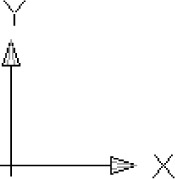
Look at the User Coordinate System (UCS) icon in the lower left corner of your screen. The X and Y arrows are pointing in the positive direction.
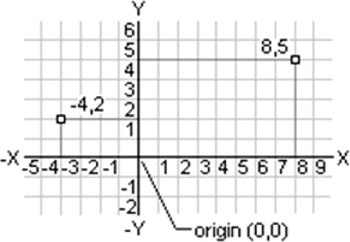
The location where the X, Y and Z axes intersect is called the ORIGIN.
The Origin always has a coordinate value of X=0, Y=0 and Z=0 (0,0,0)
When you move the cursor away from the Origin, in the direction of the arrows, the X and Y coordinates are positive.
When you move the cursor in the opposite direction, the X and Y coordinates are negative.
Using this system, every point on the screen can be specified using positive or negative X and Y coordinates.

 TABLE OF CONTENTS