AutoCAD Pocket Reference, 4th Edition

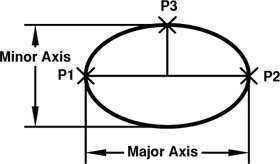
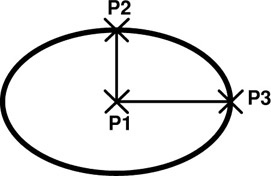
There are 3 methods to draw an Ellipse. You may (1) specify 3 points of the axes, (2) define the center point and the axis points or (3) define an elliptical Arc.
The following 3 pages illustrates each of the methods.
Select the ELLIPSE command using one of the following:
<b class="bold">Ribbon = Home tab / Draw panel / <span class="inlinemediaobject"><img alt="Image from book"> border="0"> height="30"> id="IMG_223"> src="https://images.books24x7.com/bookimages/id_30311/figu4-23_1.jpg"> title=""> width="66"></span>Keyboard = EL</b>
The following prompts will appear on the command line:
Command: _ellipseSpecify axis endpoint of ellipse or [Arc/Center]: <b class="bold"><i class="emphasis">place the first point of either themajor or minor axis (P1).</i></b>Specify other endpoint of axis: <b class="bold"><i class="emphasis">place the other point of the first axis (P2)</i></b>Specify distance to other axis or [Rotation]: <b class="bold"><i class="emphasis">place the point perpendicular to thefirst axis (P3).</i></b>

Select the ELLIPSE command using one of the following:
<b class="bold">Ribbon = Home tab / Draw panel / <span class="inlinemediaobject"><img alt="Image from book"> border="0"> height="32"> id="IMG_225"> src="https://images.books24x7.com/bookimages/id_30311/figu4-24_1.jpg"> title=""> width="67"></span>Keyboard = ELC </b>
The following prompts will appear on the command line:
Command: _ellipseSpecify axis endpoint of ellipse or [Arc/Center]: _cSpecify center of ellipse: <b class="bold"><i class="emphasis">place center of ellipse (P1)</i></b>Specify endpoint of axis: <b class="bold"><i class="emphasis">place first axis endpoint (either axis) (P2)</i></b>Specify distance to other axis or [Rotation]: <b class="bold"><i class="emphasis">place the point perpendicular to the</i></b><b class="bold"><i class="emphasis">first axis (P3)</i></b>

Select the ELLIPSE command using one of the following:
<b class="bold">Ribbon =...