AutoCAD Pocket Reference, 4th Edition

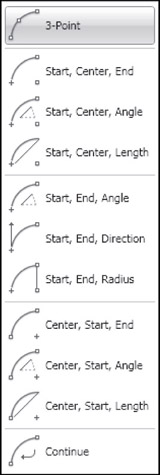
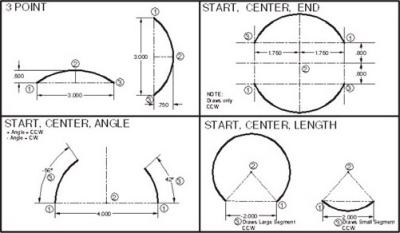
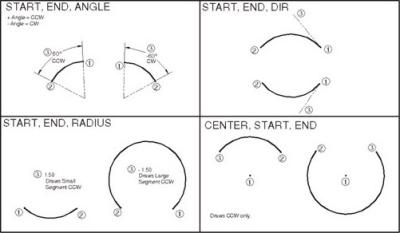
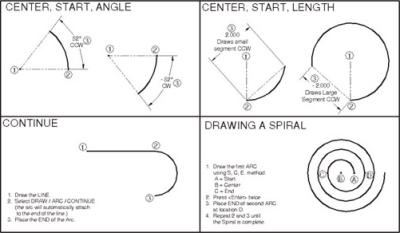
There are 10 ways to draw an ARC in AutoCAD. Not all of the ARCS options are easy to create so you may find it is often easier to trim a Circle or use the Fillet command.
On the job, you will probably only use 2 of these methods. Which 2 depends on the application.
An ARC is a segment of a circle and must be less than 360 degrees.
Most ARCS are drawn counter-clockwise but some may be drawn clockwise by entering a negative input.
Select the Arc Command using one of the following:
<b class="bold">Ribbon = Home tab / Draw panel / <span class="inlinemediaobject"><img alt="Image from book"> border="0"> height="26"> id="IMG_176"> src="https://images.books24x7.com/bookimages/id_30311/figu4-2_1.jpg"> title=""> width="43"></span>Keyboard = A</b>
Refer to the following pages for examples of each method listed below.