AutoCAD Pocket Reference, 4th Edition

MULTILEADER AND BLOCKS

In Section 3 you learned about Multileaders and how easy and helpful they are to use. Now you will learn another user option within the Multileader Style Manager that allows you to attach a pre-designed Block to the landing end of the Leader. To accomplish this, you must first create the style and then you may use it.

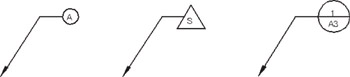
Here are a few examples of multileaders with pre-designed blocks attached:

STEP 1: CREATE A NEW MULTILEADER STYLE

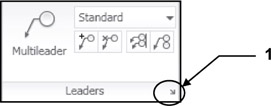
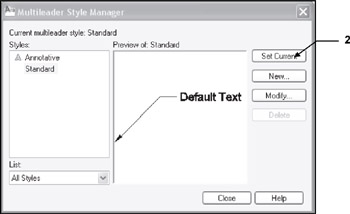
  1. Select the Multileader Style Manager tool using

    <b class="bold">Ribbon = Annotate tab / Leaders panel</b> / <span class="inlinemediaobject"><img alt="Image from book"> border="0"> height="6"> id="IMG_199"> src="https://images.books24x7.com/bookimages/id_30311/figu4-14_2.jpg"> title=""> width="6"></span>
  2. Select the New button.

  3. Enter New Style Name

  4. Select a style to Start with:

  5. Select Annotative box

  6. Select Continue button.

  1. Select the Content tab.

  2. Multileader Type: Select Block from drop down menu.

  3. Source Block: Select Circle from the drop down menu.

    Note

    You have many choices here. These are AutoCAD pre-designed blocks with Attributes.

  4. Attachment: Select Center Extents.

    Note

    This selection works best with Circle but you will be given different choices depending on which Source block you select.

  5. Color: Select Bylayer

    Bylayer works best. It means, it acquires the color of the current layer setting.

  6. Scale: Select 1.000

  7. Select OK button.

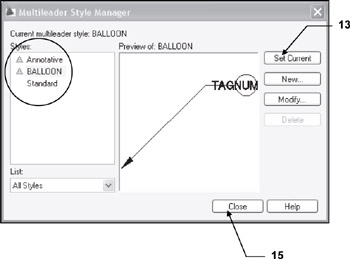
    Your new multileader style should be displayed in the Styles list.

  8. Select Set Current

  9. Select Close button.

STEP 2: USING...

UNLIMITED FREE
ACCESS
TO THE WORLD'S BEST IDEAS

SUBMIT
Already a GlobalSpec user? Log in.

This is embarrasing...

An error occurred while processing the form. Please try again in a few minutes.

Customize Your GlobalSpec Experience

Category: Biosensors and Microarrays
Finish!
Privacy Policy

This is embarrasing...

An error occurred while processing the form. Please try again in a few minutes.