AutoCAD Pocket Reference, 4th Edition

Section 12: UCS and Origin

DISPLAYING THE UCS ICON

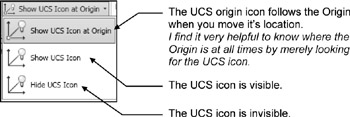
The UCS icon is merely a drawing aid. You can control how it is displayed. It can be visible (on) or invisible (off). It can move with the Origin or stay in the default location. You can even change its appearance.

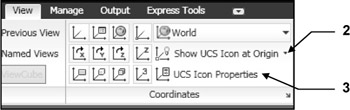
  1. Select the View tab / Coordinates panel

  2. Select the Show UCS Icon at Origin ?

  3. Select UCS Icon Properties

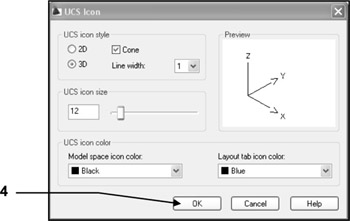
    When you select this option the dialog box shown below will appear. You may change the Style, Size and Color of the icon at any time. Changing the appearance is personal preference and will not affect the drawing or commands.

  4. Select the OK button.

MOVING THE ORIGIN

The ORIGIN is where the X, Y, and Z-axes intersect. The Origin's (0,0,0) default location is in the lower left-hand corner of the drawing area. But you can move the Origin anywhere on the screen using the UCS command. (The default location is designated as the " World" option or WCS. When it is moved it is UCS, User Coordinate System.)

You may move the Origin many times while creating a drawing. This is not difficult and will make it much easier to draw objects in specific locations.

Refer to the examples on the next page.

To MOVE the Origin:

  1. Select one of following:

    <b class="bold">Ribbon = View tab / Coordinates panel /<span class="inlinemediaobject"><img alt="Image from book"> border="0"> height="26"> id="IMG_524"> src="https://images.books24x7.com/bookimages/id_30311/figu12-3_1.jpg"> title=""> width="27"></span>Keyboard = ucs </b>Current ucs name: *WORLD*
  2. Specify origin of UCS or [Face/NAmed/OBject/Previous/View/World/X/Y/Z/ZAxis] :...

UNLIMITED FREE
ACCESS
TO THE WORLD'S BEST IDEAS

SUBMIT
Already a GlobalSpec user? Log in.

This is embarrasing...

An error occurred while processing the form. Please try again in a few minutes.

Customize Your GlobalSpec Experience

Category: Vacuum Pumps and Vacuum Generators
Finish!
Privacy Policy

This is embarrasing...

An error occurred while processing the form. Please try again in a few minutes.