AutoCAD Pocket Reference, 4th Edition

Section 8: Miscellaneous

BACKGROUND MASK

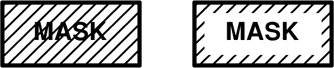
Background mask inserts an opaque background so that objects under the text are covered. (masked) The mask will be a rectangular shape and the size will be controlled by the "Border offset factor". The color can be the same as the drawing background or you may select a different color.

  1. Select the Multiline Text command.

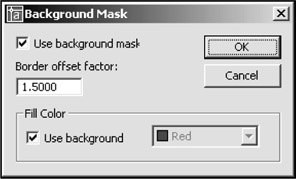
  2. Right click in the Text Area. (The dialog box below appear.)

  3. Turn this option ON by selecting the "Use background Mask" box.

  4. Enter a value for the "Border offset factor". The value is a factor of the text height. 1.0 will be exactly the same size as the text. 1.5 (the default) extends the background by 0.5 times the text height. The width will be the same width that you defined for the entire paragraph.

  5. In the Fill Color area, select the "Use background" box to make the background the same color as the drawing background. To specify a color, uncheck this box and select a color. (Note: if you use a color you may need to adjust the "draworder" using Tools/Draworder to bring the text to the front.)

BACK UP FILES

When you save a drawing file, Autocad creates a file with a .dwg extension. For example, if you save a drawing as 12b, Autocad saves it as 12b.dwg. The next time you save that same drawing, Autocad replaces the old with the new and renames the old version 12b.bak. The old version is now a back...

UNLIMITED FREE
ACCESS
TO THE WORLD'S BEST IDEAS

SUBMIT
Already a GlobalSpec user? Log in.

This is embarrasing...

An error occurred while processing the form. Please try again in a few minutes.

Customize Your GlobalSpec Experience

Category: Optical Character Recognition Software (OCR)
Finish!
Privacy Policy

This is embarrasing...

An error occurred while processing the form. Please try again in a few minutes.