AutoCAD Pocket Reference, 4th Edition

CENTERMARK

CENTERMARKS can ONLY be drawn with circular objects like Circles and Arcs. You set the size and type.

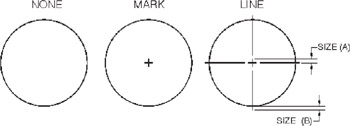
The Center Mark has three types, None, Mark and Line as shown below.

What does "SIZE" mean?

The size setting determines both, (A) the length of half of the intersection line and (B) the length extending beyond the circle. (See above right)

Where do you set the CENTERMARK "TYPE" and "SIZE"

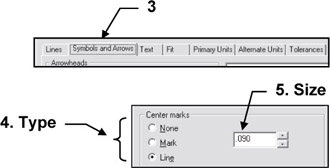
  1. Select the Dimension Style command.

  2. Select: Modify or Override.

  3. Select: SYMBOLS and ARROWStab

  4. Select the Center mark type

  5. Set the Size.

To draw a CENTER MARK

  1. Select the Center mark command using one of the following:

    <b class="bold">Ribbon = Annotation tab / Dimension <span class="unicode">?</span> panel /<span class="inlinemediaobject"><img alt="Image from book"> border="0"> height="27"> id="IMG_211"> src="https://images.books24x7.com/bookimages/id_30311/figu4-19_3.jpg"> title=""> width="27"></span></b><b class="bold">Keyboard = DCE </b>
  2. Select arc or circle: select the arc or circle with the cursor.

UNLIMITED FREE
ACCESS
TO THE WORLD'S BEST IDEAS

SUBMIT
Already a GlobalSpec user? Log in.

This is embarrasing...

An error occurred while processing the form. Please try again in a few minutes.

Customize Your GlobalSpec Experience

Category: Vacuum Furnaces
Finish!
Privacy Policy

This is embarrasing...

An error occurred while processing the form. Please try again in a few minutes.