Planning & Scheduling Using Primavera Version 5.0 for Engineering & Construction: Planning and Progressing a Single Project Schedule With and Without Resources In An Established Project Environment

Chapter 13: Group, Sort and Layouts

Overview

Group & Sort allows activities to be sorted and organized under other parameters such as Dates and Resources or user-defined Activity Codes. This function is similar to Organize in P3 and SureTrak and Grouping in Microsoft Project.

Layouts is a function in which the formatting of parameters such as the Group & Sort, Columns and Bars is saved and is similar to Layouts in P3 and SureTrak or Views in Microsoft Project. A Layout may be edited, saved or reapplied at a later date and may have a Filter associated with it.

This chapter will cover the following topics:

Topic

Notes on the Function

  • Reformat the Grouping and Sorting of activities by opening the Group and Sort form:

  • Click on the button, or

  • Select View, Group and Sort .

  • Group and Sort Projects at Enterprise Level

Projects may be Grouped and Sorted at Enterprise level in a similar method to activities in a project.

  • Create or edit a Layout

Select either:

  • From the menu View, Layout, Save As , or

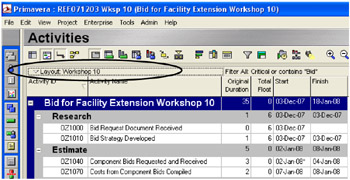
  • From the Layout bar Layout, Save As .

The Layout bar location is indicated in the picture below:

13.1 Group and Sort Activities

The Group & Sort function has been used in this book to group activities under WBS bands.

To reformat the Grouping and Sorting of activities the Group and Sort form is...

UNLIMITED FREE
ACCESS
TO THE WORLD'S BEST IDEAS

SUBMIT
Already a GlobalSpec user? Log in.

This is embarrasing...

An error occurred while processing the form. Please try again in a few minutes.

Customize Your GlobalSpec Experience

Category: Engineering Consulting Services
Finish!
Privacy Policy

This is embarrasing...

An error occurred while processing the form. Please try again in a few minutes.