Planning & Scheduling Using Primavera Version 5.0 for Engineering & Construction: Planning and Progressing a Single Project Schedule With and Without Resources In An Established Project Environment

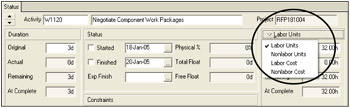
This form has a section titled Labor Units at the right hand side as seen in the picture below. The drop down menu allows you to select which data is to be displayed in this section of the form.

There is a link between the entries in this form and the values that are assigned to resources:
The values in this form are the sum of the values assigned to Resources and Roles.
When these values are edited, they will change the values assigned to Resources and Roles.
There are five Activity Types assigned in the General tab in the Activities Workspace:
| Activity Type | Notes |
|---|---|
| Task Dependent | Activities assigned as Task Dependent acknowledge their Activity Calendar when scheduling and the Finish Date is calculated from the Activity Calendar. |
| Resource Dependent | Activities assigned as Resource Dependent acknowledge their Resource Calendar when being scheduled. This is similar to an Independent Activity Type in P3 and SureTrak. The Finish Date is calculated based on the longest Resource Duration. |
| Level of Effort (LOE) | This Activity Type spans other Activities. Therefore the Start Date, Finish Date and Durations may change as the start or finish date of activities that it is dependent on change during scheduling or updating. LOE Activity Type is similar to a Hammock in P3 and SureTrak, but more relationships may control the Start and Finish Dates. There is no equivalent in... |