Planning & Scheduling Using Primavera Version 5.0 for Engineering & Construction: Planning and Progressing a Single Project Schedule With and Without Resources In An Established Project Environment

18.9: Reviewing Resources

18.9 Reviewing Resources

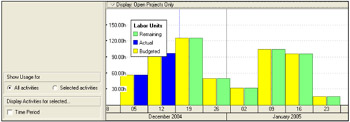
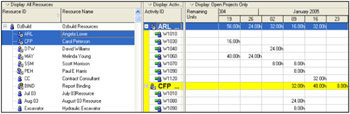
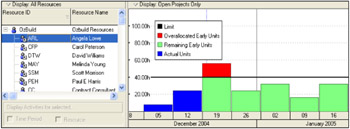
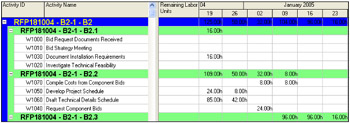
There are a number of facilities for reviewing the resource, these are typically displaying a Layout or running a report. Reports are not in the scope of this book but the following layouts may be displayed in the Activities Workspace. Formatting of these Layouts is achieved by using the menus and right clicking. The displays are affected by the Timescale interval and these Layouts will not be covered in detail as they are self-explanatory.

18.9.1 Activity Usage Profile

18.9.2 Resource Usage Spreadsheet

18.9.3 Resource Usage Profile

18.9.4 Activity Usage Spreadsheet

Workshop 15: Assigning Roles and Resources to Activities

Background

The Resources and roles must now be assigned to their specific activities.

Assignment

Open the OzBuild with Resources project non-statused and complete the following steps.

  1. In the Activities Workspace display the Gantt Chart in the top view and Resources tab of the Activities Details form in the bottom view.

  2. Open the User Preferences form:

    • Select the Ca lculations tab and set the Resource Assignments option to Preserve the Units, Duration, and Units/Time for existing assignments.

    • Select the Time Units tab and set the Units/Time format to units/duration (4h/d) and the Units Format, Units of Time to Hours with 0 Decimal Places.

    • Select the Calculations tab and select:

      • Always use the new resources Units per Time and Overtime factor and

      • Always use resource's Price per Unit.

  3. Copy the OzBuild Workshop 11

UNLIMITED FREE
ACCESS
TO THE WORLD'S BEST IDEAS

SUBMIT
Already a GlobalSpec user? Log in.

This is embarrasing...

An error occurred while processing the form. Please try again in a few minutes.

Customize Your GlobalSpec Experience

Category: Project Management Services
Finish!
Privacy Policy

This is embarrasing...

An error occurred while processing the form. Please try again in a few minutes.