Planning & Scheduling Using Primavera Version 5.0 for Engineering & Construction: Planning and Progressing a Single Project Schedule With and Without Resources In An Established Project Environment

To assign a Role to an activity:
Select the activity to be assigned the Role,
Select the Resources tab in the Activity Details form,
Click on the
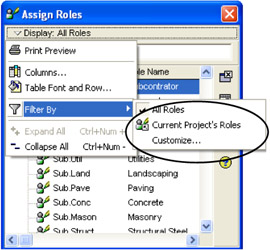
button to open the Assign Roles form,

Use the Display:, Filter By menu to select either:
All Roles, which will display all Roles in the database,
Current Project's Roles. This option will only display Roles that have been assigned to this project, or
Customize, which opens a Filter form enabling the user to limit the number of displayed Roles by creating a filter.
Select one or more Roles to be assigned to an activity using the Ctrl-click function,
Then to assign a Role:
Click on the
button, or
Double-click on one of the Roles.
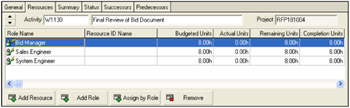
To achieve the picture below you may need to format the columns in the Resources Details form.

At this point, the Roles hours and costs may be edited as required.
Costs may be assigned to Roles but these costs are not calculated, as a Role Rate is not available from the database.
To remove a Role:
Select the Role, and
Click on the
button.