Planning & Scheduling Using Primavera Version 5.0 for Engineering & Construction: Planning and Progressing a Single Project Schedule With and Without Resources In An Established Project Environment

Primavera Version 5.0 now uses the Microsoft SQL Server Desktop Engine (MSDE) for standalone installations, Version 4.1 used Interbase.
Primavera Version 5.0 has a new multiple Undo function that operates on Resources, Resource Assignments, and Activities windows, but no Redo function.
There are many functions will erase the Undo memory such as scheduling, summarizing, importing, opening a project, opening Code forms, opening User and Admin Preferences and closing the application.
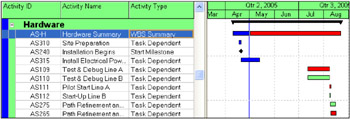
The new Primavera Version5.0 WBS Summary Activity is an activity that spans the duration of all activities which are assigned exactly the same WBS Code and unlike a Level of Effort Activity it does not have any predecessors or successors.

Therefore a WBS activity will change duration when either the earliest start or latest finish of activities that it spans is changed. This may happen as the project progresses and activities do not meet their original scheduled dates, or the duration of an activity is changed, or logic is changed, or the schedule is leveled.
This function calculates the WBS Activity Duration in the same way as WBS activities in P3 or SureTrak, Topic activities in SureTrak. It is similar to the way Summary activity durations are calculated in Microsoft Project, except the activities do not need to be demoted below the detailed activities in as in Microsoft Project.
WBS activities may be used for:
Reporting at summary level by filtering on WBS activities,
Entering...