Planning & Scheduling Using Primavera Version 5.0 for Engineering & Construction: Planning and Progressing a Single Project Schedule With and Without Resources In An Established Project Environment

Resources may be assigned directly to:
An activity that has an Assigned Role, or
An Activity without a Role.
To assign a Resource to a Role assigned to an activity:
Select the activity to be assigned a Resource,
Select the Role to be assigned a Resources from the Resources Details tab,
Click on the
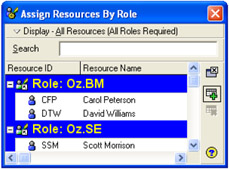
button to open the Assign Resources By Roles form,

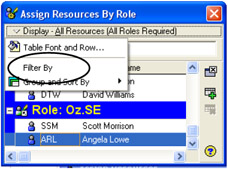
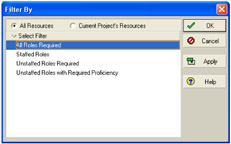
Click on the Display: menu and select Filter By to open the Filter By form,
Select which Resources you wish to have displayed in the Assign Roles form from the Filter By form,

Select
to return to the Assign Resources By Role form,
From the Assign Resources By Role form click on the Resource you wish to assign,

To assign the Resource either:
Double-click on the Resource, or
Click on the
button.
To assign a Resource to an activity:
Select the activity to be assigned the Resource,
Click on the
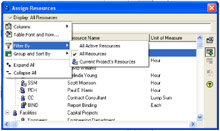
button to open the Assign Resource form,

Click on the Display: menu and select Filter By and then select from the three options which resources you wish to display in the Assign Resources form,
To assign the Resource either:
Double-click on the Resource, or
Click on the
button.
You may now edit the hours or Units/Time...