Planning & Scheduling Using Primavera Version 5.0 for Engineering & Construction: Planning and Progressing a Single Project Schedule With and Without Resources In An Established Project Environment

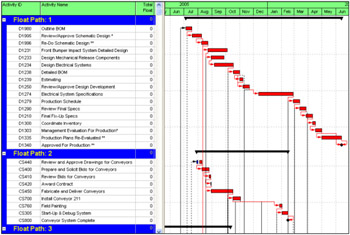
Primavera Version 5.0 has a new option that allows individual critical paths to be banded as per the picture below and is useful when analyzing larger projects that have more than one critical path:

There are 2 steps involved, firstly calculating the multiple paths and secondly displaying the multiple paths:
To calculate multiple critical paths:
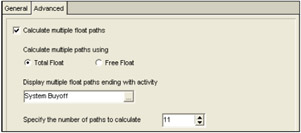
Select Tools, Schedule, Options, Advanced tab,
Click on Calculate multiple float paths,
Select if your wish to the software to use the Total Float or Free Float to calculate the multiple paths.
The Display multiple float paths ending with activity is used to select an activity that is in the middle of a schedule and the driving paths top this activity are calculated.
Select the number of paths for the software to calculate in the Specify the number of paths to calculate box.
Select
and schedule the project.

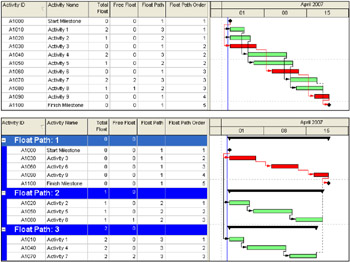
There are two fields that are populated in this process:
Float Path and
Float Path Order
Either select multiple path Layout or create a Layout that Groups by Float Path and Sorts by Float Path Order as per the examples below which show a before and after grouping:

The reader may wish to read the help file or experiment with the software to see the results.
Primavera Version 5.0 introduced four basic audit trail columns that may be...