Planning & Scheduling Using Primavera Version 5.0 for Engineering & Construction: Planning and Progressing a Single Project Schedule With and Without Resources In An Established Project Environment

Preferences that affect how all resources in a project calculate are set in the Project Workspace and pertain to all activities and resources.
Preferences set in the Activity Workspace decide how each individual activity and resource calculate and are covered in the next section.
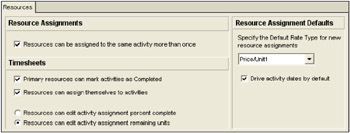
The Resources tab in the Projects Workspace:

Resource Assignments. Checking the Resources can be assigned to the same activity more than once box allows a resource to be assigned to an activity more than once. This is useful if it is required to assign a resource at the beginning of an activity and later at the end of an activity with a lag.
Drive activity dates by default. A resource has the following fields that are linked and a change to one will make a change to another:
Original Lag. The duration from the Activity Start Date to the Resource Start Date, which is the date the resource commences work.
Original Duration. The duration that a resource is working.
Start. The Resource Start Date =Activity Start Date + the Resource Original Lag.
Finish. This date is calculated by the addition of the Activity Start Date + Original Lag + the Original Duration.
With this option checked, a resource will be assigned to an activity with the Drive Activity Dates field checked and then Activity Finish date is calculated from the latest Resource Finish date that has the Driving Activity dates...