The Focal Easy Guide to Final Cut Pro 5: For New Users and Professionals

Paring down the software to its essentials, this concise, full-color book covers only the key features and essential workflow to get you up and running in no time.
 TABLE OF CONTENTS
 I fell in love with Final Cut Pro the first time I saw it and knew that it was going to be an app. that changed the world.
GARY ADCOCK
CHICAGO FINAL CUT PRO USER GROUP
As much of the post-production industry moved from film to video production a new way of working came into being. Moviolas and flat-beds had competition to deal with as a new kid appeared on the block. The kid was called the two-machine video editing suite.
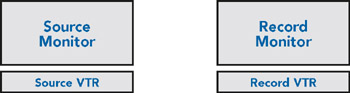
In this environment the editor would line up a shot on a source machine and edit across to a record machine. In and out points were marked, tapes pre-rolled, then run up to speed and images in the form of electronic signals were copied from one machine to the other.
The Final Cut Pro interface is modelled on the same idea.
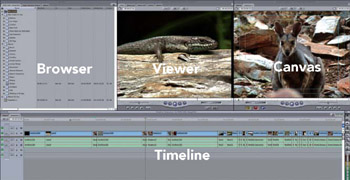
Notice the two windows located at the top right of the Final Cut Pro interface. Think of the window on the left, the Viewer, as being the source monitor and the window on the right, the Canvas, as being the record monitor. In essence, a shot is lined up in the Viewer and copied across to the Canvas. The area immediately below the Viewer and Canvas is known as the Timeline. This shows the edited shots as blocks in the order in which they have been edited. The left window above the Timeline is called the Browser. Think of this as being like a cabinet which stores...