The Focal Easy Guide to Final Cut Pro 5: For New Users and Professionals

Paring down the software to its essentials, this concise, full-color book covers only the key features and essential workflow to get you up and running in no time.
 TABLE OF CONTENTS
 You have high-end, professional, broadcast and beyond' capable tools in an easy to use package that anybody can learn.
JIM KANTER
ATLANTA FINAL CUT PRO USER GROUP
In an ideal world when one completes a project it should be as simple as deleting the files from the scratch disks which were chosen during initial setup. In reality, editors will often end up with files scattered across several hard disks with everything from clips to render files in the most obscure and hidden areas of one's computer. This situation is particularly common when one works with several projects at a time and when one fails to pay attention to the setup of scratch disks when moving from project to project. Fortunately there are a few very easy techniques which one can use without having to search through every folder on each hard drive to track down all of the files that have been used in a particular project.
An invaluable command is Make Offline found under the Modify menu. Make Offline, as the name suggests, will break the link between the project you are working with and the clips you choose to make offline. This is done in one of three ways:
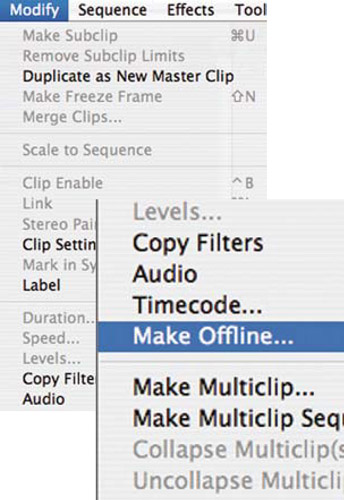
the link is broken and the clips are left stored on the hard drive
the selected clips are moved to the trash
the selected clips are deleted from the disk.
Highlight the items in the Browser which you wish to Make Offline. Clips, bins or...