The Focal Easy Guide to Final Cut Pro 5: For New Users and Professionals
Paring down the software to its essentials, this concise, full-color book covers only the key features and essential workflow to get you up and running in no time.
 TABLE OF CONTENTS
 There are no special tools anymore. Everybody has access to the same stuff.
JOE MALLER
JOE'S FILTERS
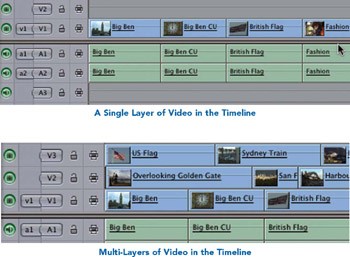
When it comes to building effects in Final Cut Pro there are several things that need to be considered. First, there are the type of effects that are applied to individual clips or to a series of clips in the Timeline these are single layer video effects. Then there are the types of effects that are termed multi-layered effects.
Look to the video track symbols at the front of the Timeline the break-off tabs are labelled V1, A1, A2 . These are the video and audio tracks. Final Cut Pro allows for up to 99 video tracks or layers to be created.
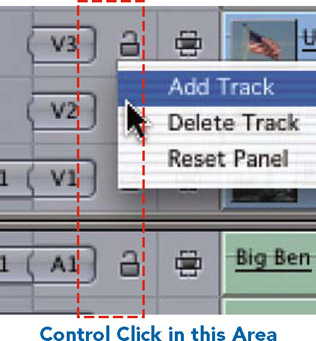
Creating a video track which means adding a layer is as simple as Control clicking in the gray area next to any of the tracks which already exist.
A menu will open giving you the choice to either add or delete a track. You can Control click above, below or to the left of the tracks in the Timeline to open up the contextual menu which allows you add or delete tracks.
When working with a single layer of video, effects can be applied in the form of Transitions, Filters and Generators.
Transitions refer to an effect that is applied between two clips. Examples include dissolves, wipes and slides.
Filters can be applied to a clip or part of any clip. They are used to change the look of images by...








