The Focal Easy Guide to Final Cut Pro 5: For New Users and Professionals
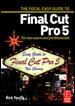
Paring down the software to its essentials, this concise, full-color book covers only the key features and essential workflow to get you up and running in no time.
 TABLE OF CONTENTS
 A very important part of the interface that we have not dealt with so far is the Toolbar. With the layout I use this is positioned to the left of the Timeline. However, it really doesn't matter where it sits on the screen providing you can readily access it.
There are nine tools available, however, generally, I use only five of these for most editing tasks. There are also other tools hidden in the submenus within the Toolbar giving a total of 22 options in all.
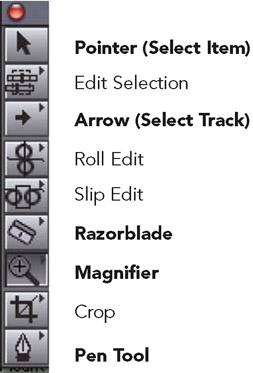
 Pointer (Select Item) I call this the home tool this is the tool I always have selected during the editing process. The Pointer is used for selecting and moving clips around in the Timeline. If I need to access the functions of the other tools I will choose another tool, use it, and then click on the Pointer again. By always having the Pointer selected you know where you are at all times.
 Arrow (Select Track) this is used for selecting individual or multiple tracks, or the entire contents of the Timeline.
 Razorblade used for cutting clips into pieces. Great for trimming edits.
 Magnifying Glass most useful for expanding and reducing the Timeline. Useful for homing in on the exact part of a clip you wish to work with.
 Pen Tool essential for adjusting audio levels. Also used for adding keyframes, thus allowing you to plot points over time. Useful for creating effects and adjusting video levels.
It is essential to understand...