The Focal Easy Guide to Final Cut Pro 5: For New Users and Professionals

Paring down the software to its essentials, this concise, full-color book covers only the key features and essential workflow to get you up and running in no time.
 TABLE OF CONTENTS
 So far we have looked at Insert and Overwrite Editing. You will have noticed other options can be chosen when one drags a clip from the Viewer to the Canvas.
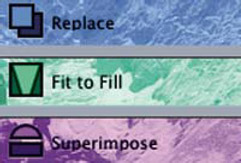
Replace Editing this is used to overwrite a shot into the Timeline, from the Viewer, with the duration being determined by the shot which already exists in the Timeline. By marking an in point in both the Viewer and Timeline/Canvas, the shot being edited will match the duration of the shot being replaced in the Timeline. There is no need to mark an out point.
Fit to Fill Four points need to be marked to achieve a Fit to Fill edit: an in and out point in the Viewer and an in and out point in the Timeline or Canvas. The shot in the Viewer will then be either sped up or slowed down to fit into the space of the shot which is being overwritten in the Timeline. The overwritten section of the Timeline will then need to be rendered (dealt with later).
Superimpose This is used for creating a second layer of video. When using this type of edit a shot is edited from the Viewer to the second video track in the Timeline. No apparent result will be noticed, other than that of an overwrite edit, unless the edited shot is reduced in size, effectively creating a picture in picture. If the opacity of the clip were to be adjusted then a superimposition would...