Learning MicroStation VBA

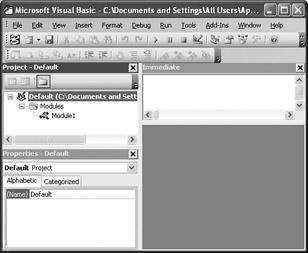
Open the VBA IDE PDQ!!! Yes, the IDE is WYSIWYG. GM?
Translation: Open the Visual Basic for Applications Integrated Development Environment Pretty Darn Quick!!! Yes, the Integrated Development Environment is "What You See Is What You Get". Got Milk?

Nearly all Microsoft Windows applications utilize Menus to issue commands. Many menu items have shortcuts. For example, holding down the

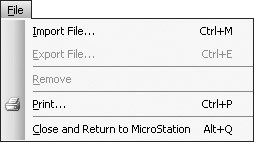
Import File imports existing form (.frm), module (.bas), and class (.cls) files into our project.
Export File exports forms, modules, and classes from our project to their own .frm, .bas, and .cls files. After these files have been exported, they can be imported into another project.
Remove removes forms, modules, and classes from our project. When we attempt to remove an element from our project we are asked if we want to export it (save it) first.
Print allows us to print code and/or forms.
Close and Return to MicroStation hides the VBA environment and gives MicroStation focus.

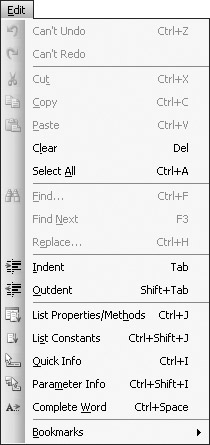
Undo and Redo are standard Windows menu items.
Cut, Copy, and Paste perform standard Windows Clipboard...