Learning MicroStation VBA

Chapter 27: Non-Graphical Info - Databases

We can store data about design file elements in a database instead of in design files. This makes the design file smaller and the file element information available outside of the MicroStation environment.

This chapter focuses on MicroStation's Database Link functionality. A later chapter discusses additional ways to work with databases.

How MicroStation 'link' elements to Databases

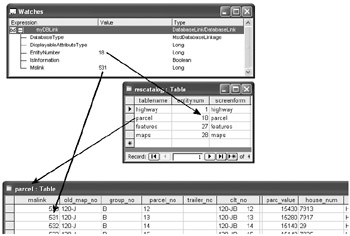
MicroStation allows us to link an element to a database record by attaching a "DatabaseLink" object to the element. Databases contain tables, each table contain rows (or records), and each row contains columns. The DatabaseLink object contains the information necessary for MicroStation to find the table and row that is linked to the element. The DatabaseLink properties that store these pieces of information are the "EntityNumber" and the "Mslink" properties.

At the top of this image is a DatabaseLink object that is attached to an element in a design file. Let's look at the DatabaseLink's EntityNumber property.

We use the EntityNumber of a DatabaseLink to help determine to which table the DatabaseLink is pointing. The EntityNumber value is numeric, so it does not tell us which table to look in, only how to find the table to look in. Each database that is used with DatabaseLinks has an "mscatalog" table, which matches the DatabaseLink.EntityNumber property with the database table we need. When we find a matching "entitynum" value in the "mscatalog" table, the "tablename" field tells the table of the record.

When we know the table, we look there for a matching "mslink"...

UNLIMITED FREE
ACCESS
TO THE WORLD'S BEST IDEAS

SUBMIT
Already a GlobalSpec user? Log in.

This is embarrasing...

An error occurred while processing the form. Please try again in a few minutes.

Customize Your GlobalSpec Experience

Category: RFID Tags
Finish!
Privacy Policy

This is embarrasing...

An error occurred while processing the form. Please try again in a few minutes.