Learning MicroStation VBA

Objects, as we have discussed, have properties, methods, and events. We introduced events when we discussed creating a Visual Interface. When a user clicks on a CommandButton, the click event of the CommandButton is triggered. MicroStation events are triggered as the user interacts with various aspects of MicroStation.
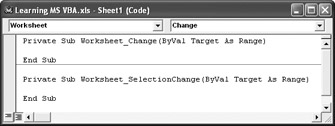
When a company (such as Bentley) embeds VBA into their application (in this case, MicroStation), the question of how to deal with events is raised. Here is how Microsoft Excel deals with events:

Each worksheet in an Excel workbook has events automatically exposed. Two of them are the Change and the SelectionChange events. These events are triggered as a worksheet's cell value changes and when the user moves from one cell to another.
There are two ways we can capture and make use of MicroStation events. One is to declare a variable in a class module or a form as an application and using the "WithEvents" keyword. This exposes two events: OnDesignFileOpened and OnDesignFileClosed. The majority of MicroStation events are accessed through the use of interfaces.
MicroStation has exposed much more than simple events through the use of interfaces, which are discussed in detail in Chapters 22 through 26.
Here is a small example of how the OnDesignFileOpened and OnDesignFileClosed events work.
We will use a UserForm that is shown modeless. This means the user can still interact with MicroStation even though the form is displayed. When the form is initialized, we set...