Learning MicroStation VBA

Chapter 22: MicroStation File-Based Events

You can execute code whenever a specific event happens, such as writing a file name to an ASCII text file each time a file is opened. This chapter deals with MicroStation file-based events using some very powerful programming techniques.

We looked briefly at two of these events in Chapter 14 but will cover them in detail here.

OnDesignFileOpened

The OpenDesignFileOpened event is part of the MicroStation Application Object. Each time a design file is opened, the OnDesignFileOpened event is triggered. Let's add some very simple code to this event.

To begin, this event is only available when a variable is declared as an "Application" type of object using the "WithEvents" keyword.

Create a new class module and name it clsSaveAs.

Dim WithEvents myMS As Application

Where is this declaration made? In the General Declarations area of the class module clsSaveAs.

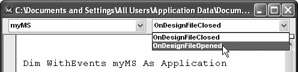
When the variable myMS is declared, the events of this object display in the Procedure ComboBox in the class module.

Selecting OnDesignFileOpened in the ComboBox automatically declares the OnDesignFileOpened Event.

Private Sub myMS_OnDesignFileOpened(ByVal _                            DesignFileName As String)    Dim ffile As Long    ffile = FreeFile    Open "C:\MicroStation VBA\FileOpen.txt" For Append As #ffile        Print #ffile, Now & vbTab & DesignFileName   ...

UNLIMITED FREE
ACCESS
TO THE WORLD'S BEST IDEAS

SUBMIT
Already a GlobalSpec user? Log in.

This is embarrasing...

An error occurred while processing the form. Please try again in a few minutes.

Customize Your GlobalSpec Experience

Category: Embedded Programming Software
Finish!
Privacy Policy

This is embarrasing...

An error occurred while processing the form. Please try again in a few minutes.