Learning MicroStation VBA

Chapter 18: Interface Essentials

Overview

What is an interface? The term is used in programming to describe several different things, so lets explain and define the term.

We have already worked with user forms and controls to create a graphical user interface, which allows users to interact with controls. The graphics provide an interface to the code of the program.

Another type of interface allows us to interact with code in a program but does not have a graphical component. It allows us to interact with the user's activities in MicroStation. For example, when a user selects an element in MicroStation, we can capture that activity through the use of an interface named "ILocateCommandEvents". As the user picks points in MicroStation, we can capture those points through the use of the "IPrimitiveCommandEvents" Interface.

User interaction with some dialogs in MicroStation can be evaluated through the use of the "IModalDialogEvents".

Interface Basics

The ability to capture user interaction in MicroStation is powerful. To harness this power, we create a new class module that implements the interface. For example, to capture point selections in MicroStation, we insert a new class module in our VBA project and place the following line in the General Declarations area of the class module:

Implements IPrimitiveCommandEvents

Using the "Implements" keyword in a class module means the class module inherits the methods or events of the interface.

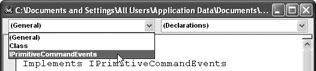
When we use the Implements keyword, the name of the interface appears in the object combobox of the class module.

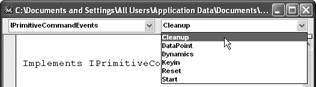
If we select the interface...

UNLIMITED FREE
ACCESS
TO THE WORLD'S BEST IDEAS

SUBMIT
Already a GlobalSpec user? Log in.

This is embarrasing...

An error occurred while processing the form. Please try again in a few minutes.

Customize Your GlobalSpec Experience

Category: Pressure Controllers
Finish!
Privacy Policy

This is embarrasing...

An error occurred while processing the form. Please try again in a few minutes.