Learning MicroStation VBA

InputBoxes and MessageBoxes allow the user to interact with our code. Their functionality is somewhat limited, however. When our goal can be accomplished with a MessageBox, it should be used. But when we need a richer interface or more dynamic interaction with the user, we need to use Forms.
The next four examples are on the CD accompanying this book. Import them one at a time by using the VBA menu File > Import File and selecting the appropriate file from the CD. This imports a new form into the active VBA project.
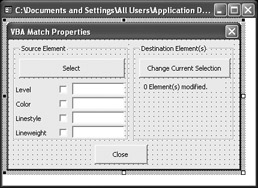
The first form, "frmMatchProperties. frm", looks like this:

The form looks simple enough. We have a few command buttons, a couple of frames, a handful of check boxes, a label, and four text boxes.Before we look at the code behind the controls, let's discuss the program's desired functionality.
The user can select a Source element in MicroStation. After the element is selected, the Select button is clicked and four properties are extracted from the selected element: level, color, linestyle, and lineweight.
The user can select which of the properties from the source element are to be changed in the Destination Elements.
The user can select any number of elements in MicroStation to be modified based on the selected properties of the source element.
This sounds simple enough. Let's get started. Even though the form can be imported from the CD, we will discuss the entire...