Learning MicroStation VBA

Chapter 5: Modules, Forms, and Class Modules

Overview

We have already discussed the basics of how MicroStation VBA projects. modules, forms, and classes are used to create programs that improve productivity and accuracy. That much we know. It's time to learn when to use each of these design elements and how they work together.

Modules

Code modules are the foundation of every VBA project. We use them to declare variables that can be used from within the code module, by other code modules, by forms, and even by class modules. Windows API functions are declared in modules so the API calls can be used in our project (more on Windows API functions later in the book). Procedures and functions inside modules can be run from the VBA Project

Manager. In fact, code modules are so essential that an initial code module is created every time a new VBA project is created. Procedures written in code modules are the starting point for running code and displaying forms.

Enough talking. Let's write some code.

Let's begin by creating a new VBA project named Chapter 05. Save it in the folder C:\MicroStation VBA. After this new project is created, you can see that a code module named "Module 1" is created automatically. Rename this module modCh05.

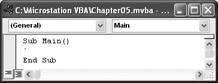
Continue by creating a new procedure named Main. Inside the code module, type

Sub Main()

When you press the key after typing the above code, VBA finishes the new procedure by entering an "Exit Sub" for us. At this point,...

UNLIMITED FREE
ACCESS
TO THE WORLD'S BEST IDEAS

SUBMIT
Already a GlobalSpec user? Log in.

This is embarrasing...

An error occurred while processing the form. Please try again in a few minutes.

Customize Your GlobalSpec Experience

Category: Core Modules
Finish!
Privacy Policy

This is embarrasing...

An error occurred while processing the form. Please try again in a few minutes.