Learning MicroStation VBA

Chapter 34: Working With Excel

Microsoft Excel is used for a great variety of things. A large number of us use it, even though we may use it differently. Many of us use it for calculations. Others use it for generating charts and graphs. Others use it to balance their checkbook.

In the examples in this chapter we will be writing our code in MicroStation's VBA environment. In a later chapter we will write code in Excel's VBA environment.

Connecting to Excel

There are three ways to 'connect' to Excel. We will begin by using "GetObject".

GetObject

Sub <b class="bold">TestExcelA</b>()    Dim myExcel As Object    Set myExcel = GetObject(, "Excel.Application")End Sub

GetObject 'gets' an existing instance of Microsoft Excel.

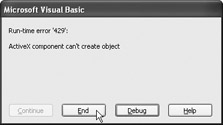
If Excel is not running, we see an error when we attempt to 'get' Excel.

When we see this error, we know we just attempted to "Get" Excel and Excel was not running. If Excel is running, the macro TestExcelA runs without any problems. But what does TestExcelA do?

We declare a variable, myExcel as an Object. Then we Set the variable to the return value of GetObject. After the variable myExcel is set, it is the Microsoft Excel Application. Everything we do to the variable myExcel impacts Excel.

When we declare a variable as an 'Object', we are performing "Late Binding". This means that before the Object is Set, the Object doesn't know who or what it is. When we declare a variable as a specific...

UNLIMITED FREE
ACCESS
TO THE WORLD'S BEST IDEAS

SUBMIT
Already a GlobalSpec user? Log in.

This is embarrasing...

An error occurred while processing the form. Please try again in a few minutes.

Customize Your GlobalSpec Experience

Category: Bus Analysis Software
Finish!
Privacy Policy

This is embarrasing...

An error occurred while processing the form. Please try again in a few minutes.