Learning MicroStation VBA

Thus far we have used SendCommand with "DELETE", "PLACE LINE", and "PLACE BLOCK". Even though these commands may look familiar to some readers, they may be foreign to others. Each time a menu item is selected or toolbar button clicked, a command is issued to MicroStation. How do we know what these commands are? Good question.
The MicroStation VBA macro recorder can help us to discover command names and how they are used. Let's try recording a few macros to demonstrate this.
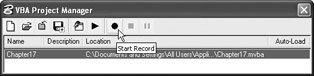
From the VBA Project Manager, select the VBA Project in which we are currently working and then click the record button.

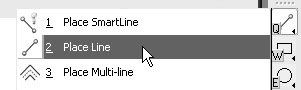
Now, select the Line Command from the toolbar as shown:

"Place Line" begins by asking for points between which to draw lines. Select two points in MicroStation and then click the right mouse button to issue a reset.
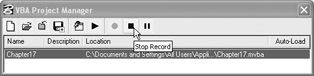
Next, stop recording the macro by clicking the "Stop Record" button.

After macro recording has stopped, return to the VBA environment to see the new macro. The macros are named automatically so the names may vary from computer to computer.
The results of this recorded macro should look similar to this:
Sub <b class="bold">Macro1</b>() Dim startPoint As Point3d Dim point As Point3d, point2 As Point3d Dim lngTemp As Long ' Start a command CadInputQueue.SendCommand "CGPLACE LINE CONSTRAINED " ' Coordinates...