Planning Using Primavera SureTrak Project Manager Version 3.0 Revised 2006
Chapter 9: Assigning Activity Codes and Organizing

Overview

Activities are assigned Activity Codes and then activities may be grouped and sorted under these codes, enabling the same information to be presented in a number of different formats.

Activity Codes must be assigned to activities before the activities may be grouped under their code. The activities are then sorted under their respective Activity Code headings using the Organize function.

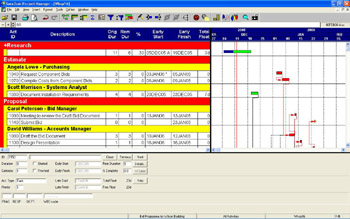
The example below shows a project organized by Phase and Responsibility. Phase headings, such as Research and Estimate, are shown in Bands, with their associated activities below them. Activities under bands may be summarized, with their activities hidden. These have a + in front of the band heading and a summary bar representing all the activities in the bar area.

Projects may be organized by Activity Codes and many other Activity Data Items such as Resources, Dates, Float, Percentages, Predecessors and Successors which make the analysis of the schedule very simple when used in conjunction with Filters which reduce the number of activities in view.

The bands are summarized by:

  • Double clicking on the band

  • Selecting Format, Summarization or

  • Using the Summarize icons on the toolbar.

This will be covered in more detail later.

9.1 Assigning Activity Codes

Activity Codes may be assigned to activities as they are created or may be assigned later. Activity Codes may be assigned or changed by either:

  • Using the Activity Code boxes at the bottom of the Activity form, press F7 to open.

  • Creating a column for...

UNLIMITED FREE
ACCESS
TO THE WORLD'S BEST IDEAS

SUBMIT
Already a GlobalSpec user? Log in.

This is embarrasing...

An error occurred while processing the form. Please try again in a few minutes.

Customize Your GlobalSpec Experience

Category: Standards and Technical Documents
Finish!
Privacy Policy

This is embarrasing...

An error occurred while processing the form. Please try again in a few minutes.