Planning Using Primavera SureTrak Project Manager Version 3.0 Revised 2006
This chapter covers the ability of SureTrak to reduce the number of activities that are displayed both on the screen and in printouts by using Filters.
SureTrak has an ability to display only activities that meet specific user defined criteria. Filters may be created that display only activities in a specific phase, area, discipline or the work over the next couple of months. SureTrak defaults to displaying all activities and has a number of filters already available that you might like to use or edit.
Select Format, Filter or click the
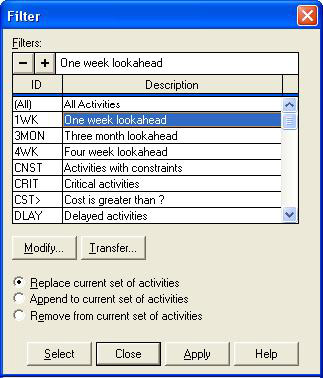
icon on the toolbar to open the Filter form:

Select the filter by clicking on it and click on the
button and this displays the filter specification for editing the filter criteria.
is a facility for copying filters from other project files.
applies the selected filter and then displays or hides activities that meet the filter criteria and according to the selected method of applying the filter:
Replace current set of activities only displays activities that meet the filter criteria.
Append to current set of activities adds activities to the display that meet the filter criteria when they have previously been filter out.
Remove from current set of activities removes from the display activities that meet the filter criteria.
highlights activities that meet the filter s criteria.
The process of creating a new filter to...