Planning Using Primavera SureTrak Project Manager Version 3.0 Revised 2006
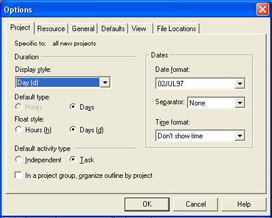
The Options forms allow you to decide how SureTrak calculates and displays information. Most of the options are self-explanatory. Under Tools, Options, there are six tabs:
Project
Resource
General
Defaults
View
File Locations
This chapter will explain the functions of each function form.
The Options form may also be opened by double clicking on the Datometer.
IMPORTANT NOTE: When the options are set without any project open then the Project and Resource options are the default options that are applied to any new project created from a template. It is very important that these options are set before new projects are created. The standard load of SureTrak has options that unnecessarily complicate the schedule and it is suggested that the options set in the following screen shots are a good start point for new schedulers.
This information was covered in the chapter CREATING A PROJECT AND SETTING UP THE SOFTWARE. To recap:

Duration
Display Style is the format used in the bar chart columns. Select Days unless more detailed planning is required.
Default Type specifies the format in which durations may be entered and how they are displayed on the screen. If Days is selected as the default, then a duration entered as 2 will give a 2 day duration activity. A 2 hour duration activity should be entered as 2h.
Float Style is the display format for float.
Default Activity Type
This should be set as Task unless advanced...