Planning Using Primavera SureTrak Project Manager Version 3.0 Revised 2006
When a resource is assigned to an activity it has three principal components:
Quantity, such as hours, days, weights or lengths
Cost
Revenue which is the expected income
Each component has its own form.

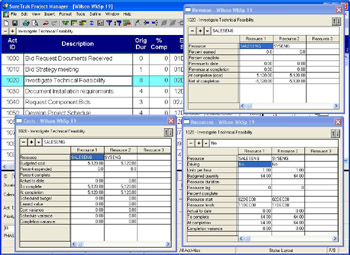
The Quantity component of the resource which is displayed in the Resource form
The Cost component which is displayed in the Cost form
The Revenue component which is displayed in the Revenue form
The resource data may be displayed in all three forms when a Resource is assigned to an activity. Quantities or Costs may be zero if they are not assigned a value.
The Budget Quantity and Cost are set to equal the At Completion when a Resource is assigned to an activity.
There is a link between the Quantity, Units per hour and Remaining Duration, which is set to equal the Original Duration in an un-progressed activity. A change to one value will change one of the other two depending on the setting of the Tools, Options, Resource tab, Freeze resource units per hour, as outlined in the OPTIONS AND SCHEDULE FORMS chapter.
Resources may be assigned to activities using one of the following methods:
Insert Resource Assignment form
Resource form
Costs form
Revenue form
Copy and paste resources from a spreadsheet
Highlight the activity to be assigned a resource. Select Insert, Resource Assignment or click the
icon on the toolbar to display...