Planning Using Primavera SureTrak Project Manager Version 3.0 Revised 2006

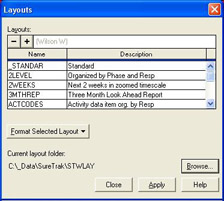
Layouts allow the user to save formatting such as Organize and Column settings and apply them at a later date to the current project or other projects. The formatting undertaken so far has altered the default Layout. You may create as many layouts as you like, save them and then you may switch between the layouts as you require.
Layouts are not stored as part of the project file but are saved as individual files with a *.lay file extension may be common to all projects. Layouts may be stored in any directory location, but the ones that are available to the current project are stored in the sub-directory nominated in Tools, Options, Directories.
Layouts may be applied using the View, Layouts menu command or clicking on the
button which will open the Layouts form and a layout may be selected from the list and applied by clicking on the
button.

The default location for the Layouts may be selected using the
button. This permanently changes the default Layout Location and may be reset here or in the Options form.
Layouts designed for other project coding systems may not be logical for the active schedule.
Select View, Layouts or click on the
button to open the Layouts form:
Highlight the layout you wish to copy as the new layout.
Select
to create...