Planning Using Primavera: Suretrak Project Manager Version 3.0
Chapter 6: Adding Activities

Activities should be well defined and measurable pieces of work with a measurable outcome. Activities such as Slab have confusing meanings. Does this mean form up, inspect, pour, fix reo, cure or all of these? A more appropriate activity would be Pour Slab or maybe Install & Cure Slab . It also helps to repeat the code title in the activity description (ie: Install & Cure Slab First Floor if you have room). The limit for the descriptions is 48 characters so try to keep the activity descriptions brief but meaningful.

6.1 Adding New Activities

There are several methods to add a task or activity.

Method 1

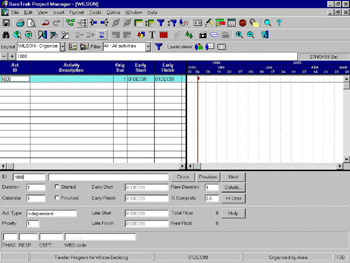
The first and easiest is to click on the plus sign toward the top left of the screen. Press F7 to access the Activity Form or select View, Activity Form.

  • In the Activity Form, accept the SureTrak Activity ID or replace it with your own.

  • Tab and enter the Description.

  • Tab and enter the Duration.

  • Tab and assign the calendar if Calendar 1 is not correct.

  • The Remaining Duration (Rem Dur) will default to the original duration.

Method 2

The second method of adding an activity is to just click on the area below the existing activities. SureTrak will automatically create an activity for you.

Method 3

The third method is to select Insert, Activity or press the Ins (insert) key on the keyboard.

6.2 Copying Activities in SureTrak

Activities may also...

UNLIMITED FREE
ACCESS
TO THE WORLD'S BEST IDEAS

SUBMIT
Already a GlobalSpec user? Log in.

This is embarrasing...

An error occurred while processing the form. Please try again in a few minutes.

Customize Your GlobalSpec Experience

Category: Advertising and Marketing Services
Finish!
Privacy Policy

This is embarrasing...

An error occurred while processing the form. Please try again in a few minutes.