Planning Using Primavera: Suretrak Project Manager Version 3.0
Chapter 15: Creating and Using Resources

Overview

A resource may be defined as something or someone that is assigned to an activity and is required to complete the task. This includes people or groups of people, materials, plant, access and money.

It is recommended that you assign the minimum number of resources to activities. Avoid cluttering the schedule with resources that are in plentiful supply or are of little importance.

The following steps should be followed to create and use resources in a SureTrak schedule:

  • Create your resources in the Resource Dictionary

  • Assign the resources to activities

  • Manipulate the resource calendar if resources have special timing requirements

15.1 Creating Resources

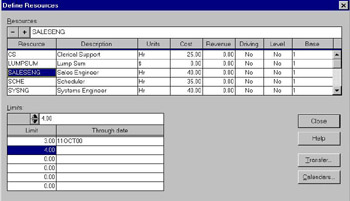
Select Define, Resources to add resources to the resource dictionary.

  • Use the icon to insert a new resource.

  • Enter the Resource code, up to 8 characters long.

  • Enter the Description, up to 40 characters.

  • Enter the Units, eg: Hrs, Days, up to 4 characters.

  • Enter the Cost if you wish to calculate the cost and/or monitor cost of the resource.

  • Enter the Revenue if you wish to calculate the revenue that will be generated by the resource.

  • Driving - When No is selected, resources are assigned to activities as Non-driving. They may be changed to Driving after assignment. If Yes is selected then the reverse applies.

  • Level - When this option is set to No the resource is assigned to an activity as not requiring leveling. When Yes the Resource is leveled.

UNLIMITED FREE
ACCESS
TO THE WORLD'S BEST IDEAS

SUBMIT
Already a GlobalSpec user? Log in.

This is embarrasing...

An error occurred while processing the form. Please try again in a few minutes.

Customize Your GlobalSpec Experience

Category: Enterprise Asset Management Software (EAM)
Finish!
Privacy Policy

This is embarrasing...

An error occurred while processing the form. Please try again in a few minutes.