Planning Using Primavera: Suretrak Project Manager Version 3.0
Chapter 21: What Is New In Suretrak Version 3.0

Overview

The following is a list of the new features available in SureTrak Version 3.0.

  • Long File Names

  • Layout Tool Bar with Drop-Down Filters and Layouts

  • Interactive Filters

  • Modify Selected Bar

  • Zoomed Timescale

  • Timescaled PERT

  • Web Publishing Wizard

  • Resource Profile/Table Enhancements

  • Primavera Post Office

21.1 Long File Names

SureTrak Version 3.0 is a 32 bit software and the standard format for SureTrak files now allows long file names (SureTrak Version 2.0 allowed a maximum of eight characters in the file name).

If you are using Concentric (P3) or Program Groups you are still restricted to a file name of 4 characters.

21.2 Layout Tool Bar with Drop-Down Filters and Layouts

A third tool bar has been introduced, the Layout toolbar, allowing faster access to layouts and filters. This toolbar is displayed and hidden by selecting View, Layout Toolbar.

  • Layouts and filters are selected using the drop-down boxes.

  • The display in lower views may also be selected using this toolbar.

21.3 Interactive Filters

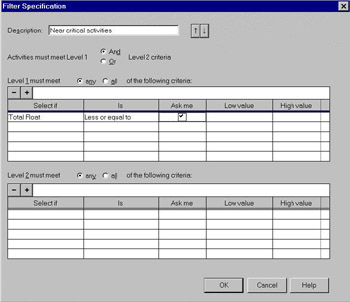
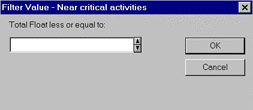
When you create a filter and tick the Ask Me box.

When you apply the filter you will be presented with the Filter Value form allowing you to nominate the value required for the filter.

This feature is very useful as you now only need to create one filter which may be used for a number of purposes.

21.4 Modify Selected Bar

This new function allows you to modify one or more selected bars with color and style...

UNLIMITED FREE
ACCESS
TO THE WORLD'S BEST IDEAS

SUBMIT
Already a GlobalSpec user? Log in.

This is embarrasing...

An error occurred while processing the form. Please try again in a few minutes.

Customize Your GlobalSpec Experience

Category: UV Filters
Finish!
Privacy Policy

This is embarrasing...

An error occurred while processing the form. Please try again in a few minutes.